Developer Guides
How to Use the Jev AI Model: A Step-by-Step Developer Guide
Learn how to use the Jev AI model for classification, routing, scoring, and safety checks with State, typed questions, the Playground, and the Jev API.
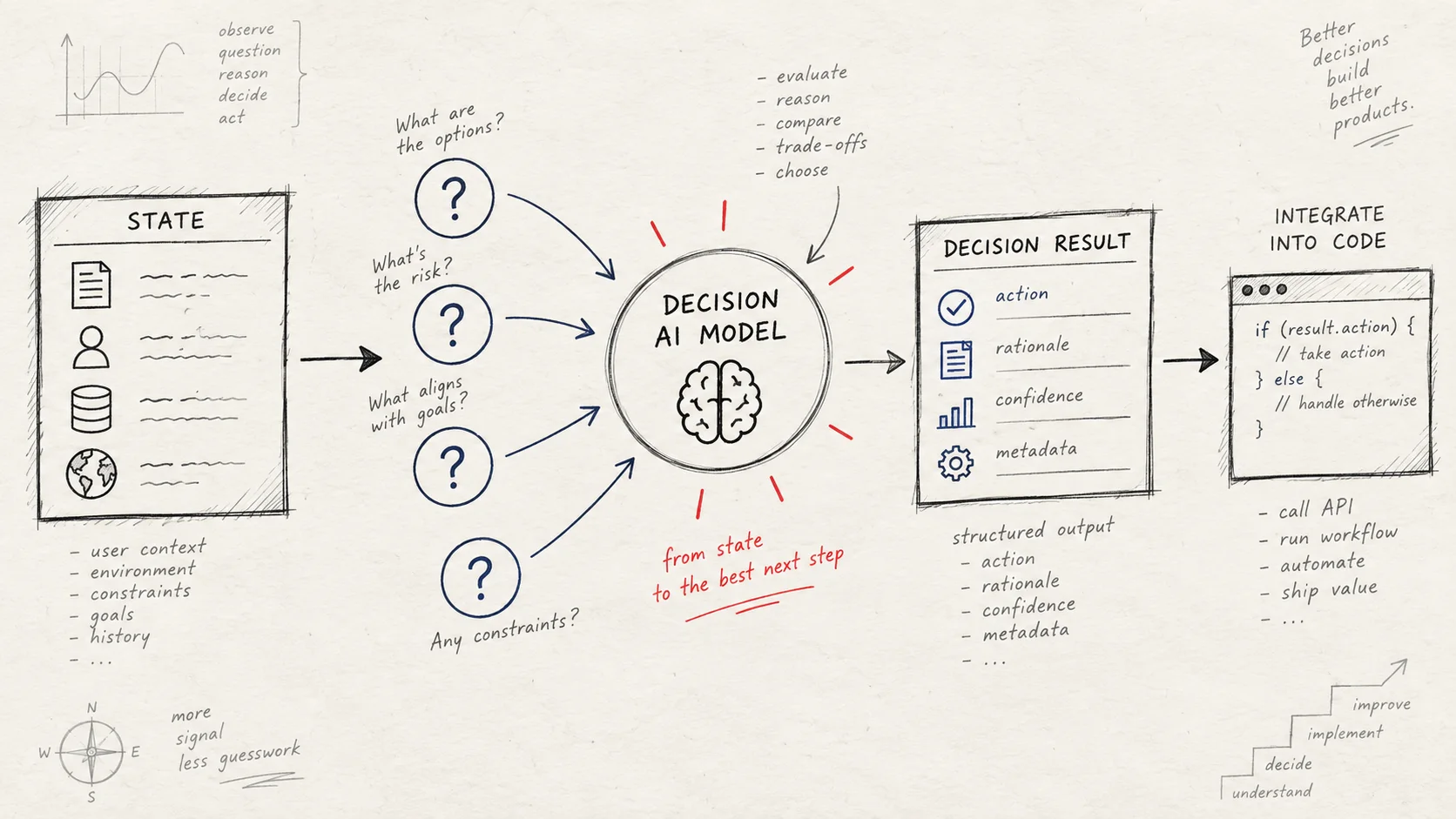
If you are searching for how to use the Jev AI model, start with one practical idea: Jev is designed to make decisions that software can consume, not to replace a chat interface. You provide a piece of state, ask one or more typed questions, and receive structured answers with probability signals.
That makes Jev useful for tasks such as classifying support tickets, routing requests, scoring risk, deciding whether an action needs review, or selecting the next model in an agent workflow. The Jev AI homepage describes this as a decision layer for software teams.
This guide shows the complete path from the first experiment to a server-side API integration.
What the Jev AI model does
Traditional language models are usually asked to generate text. Jev focuses on a narrower and more operational question: given this state, what structured decision should the application use next?
The basic interaction has three parts:
- State — the text, JSON object, or array of text that provides context.
- Questions — the decisions your application needs answered.
- Answers — typed results that your code can branch on, sort, route, or review.
For example, a support workflow could send a ticket as state and ask Jev to determine its department, urgency, and whether a person should review it. These questions can be evaluated together against the same state.
Jev is most useful when the answer space is clear. If you need an open-ended explanation, a creative draft, or a long conversational response, a generative LLM is usually a better fit. Jev can still sit before or after an LLM to control routing and execution.
Step 1: Choose one decision with a clear outcome
The first step in learning how to use Jev AI is not writing a prompt. It is defining the decision your product needs to make.
Good first decisions are:
- Which team should receive this support request?
- Is this request urgent enough to enter a priority queue?
- Does this proposed tool call need human approval?
- How severe is the issue on a defined scale?
- Which model should handle the next step?
Avoid starting with a vague request such as “understand this customer.” Turn it into a bounded question like “Which approved support team should handle this ticket?” A narrow question is easier to evaluate, easier to test against historical examples, and safer to connect to application logic.
Step 2: Prepare the state
State is the context every question reads. Jev currently accepts three useful input shapes:

Text state
Use a string for a message, ticket, email, or short document.
{
  "state": "My payout has failed three times and I need help before payroll runs tomorrow."
}
JSON object state
Use an object when the decision depends on several named fields. This keeps important context explicit instead of hiding everything in one long prompt.
{
  "state": {
    "message": "My payout has failed three times.",
    "account_age_days": 420,
    "recent_failures": 3,
    "requested_action": "retry payout"
  }
}
Array state
Use an array when the context is naturally made up of multiple text items, such as several messages or notes. Keep the array focused on the evidence needed for the decision.
Do not send more data than the question needs. Smaller, relevant state makes the workflow easier to understand and helps you identify which evidence influenced an answer.
Step 3: Select the right question type
Jev provides three core question types. Choose the type that matches the shape of the decision rather than trying to force every task into a yes-or-no prompt.

| Question type | Best for | Typical result |
|---|---|---|
Choice |
Classification or routing | One option from a predefined set, plus probabilities and confidence |
Score |
Severity, quality, or intensity | A position on an ordered rubric, plus probabilities and confidence |
Noul |
A focused yes-or-no judgment | A 0–1 probability that the answer is yes |
Use Choice for classification
Choice is appropriate when the application has a finite set of destinations. For example, billing, technical, and sales can be the approved teams for a ticket.
Use Score for a spectrum
Score is useful when there are ordered levels, such as low, medium, and high severity. Define the levels from low to high. The returned score is probability-weighted, so it can express a position between the named levels.
Use Noul for a specific proposition
Noul is a good fit for questions such as “Does this request contain an urgent deadline?” or “Should a human review this action?” The result is a probability from 0 to 1 that the proposition is true.
You can mix Choice, Score, and Noul in one request. Give every question a stable key, because the same key is used to find its answer in the response.
Step 4: Validate the decision in the Playground
Before adding credentials or production code, test the question with real examples in the Jev AI Playground.

Use this short validation loop:
- Paste a representative state.
- Add one well-scoped question.
- Run the decision and inspect the answer and probability.
- Repeat with clear examples, edge cases, and ambiguous cases.
- Rewrite the instructions or criteria if the result is difficult to interpret.
The goal is not to make a single example look correct. Build a small evaluation set that represents the traffic your application will actually receive. Include cases where the correct action is to pause, ask for more information, or send the item to human review.
Step 5: Call the Jev API from your server
Once the question is useful, create an API key and call the production endpoint from a server-side service. The current endpoint is:

POST https://thejevai.com/v1/systemone
Send the API key as a Bearer token and include state, model, and questions in the JSON body. The current flagship model name in the API reference is jev-latest.
curl -X POST https://thejevai.com/v1/systemone \
  -H "Authorization: Bearer $JEV_API_KEY" \
  -H "Content-Type: application/json" \
  -d '{
    "model": "jev-latest",
    "state": {
      "message": "My payout has failed three times.",
      "days_waiting": 3
    },
    "questions": {
      "department": {
        "type": "choice",
        "instructions": "Which team should handle this request?",
        "criteria": {
          "billing": "Payments, invoices, refunds, or payouts",
          "technical": "Bugs, outages, or integration failures",
          "sales": "Pricing, upgrades, or new accounts"
        }
      },
      "needs_human": {
        "type": "noul",
        "instructions": "Does this request require human review?"
      }
    }
  }'
Keep JEV_API_KEY in a server-side environment variable. Do not put it in browser code, a public article, a client bundle, or a repository.
Step 6: Use the structured response in application code
The response contains an answer for each question key. A simplified response may look like this:
{
  "model": "jev-1.13.0",
  "answers": {
    "department": {
      "type": "choice",
      "choice": "billing",
      "probabilities": {
        "billing": 0.94,
        "technical": 0.05,
        "sales": 0.01
      },
      "confidence": 0.92
    },
    "needs_human": {
      "type": "noul",
      "noul": 0.87
    }
  },
  "usage": {
    "input_tokens": 180,
    "output_tokens": 24
  }
}
Your application should decide what happens next. For example:
const department = result.answers.department.choice;
const humanProbability = result.answers.needs_human.noul;

if (humanProbability >= 0.8) {
  await queueForReview(ticket.id);
} else {
  await routeToTeam(ticket.id, department);
}
The important boundary is that Jev returns a signal while your code owns the action. Jev should not silently delete data, send a payment, publish content, or call a sensitive tool without an application-level permission check.
How to use probability and confidence safely
Probability and confidence are useful for routing, ranking, and escalation, but they are not a guarantee that a business decision is correct. Treat them as signals that help your system choose a path.
A practical policy might be:
- high probability and low risk → continue automatically;
- medium probability or an unfamiliar case → collect more context;
- high-risk action or low confidence → require human approval;
- unsupported or malformed input → return an error or use a safe fallback.
Choose thresholds using historical examples, then monitor false positives and false negatives after launch. A threshold that works for support routing may be inappropriate for payments, account access, or destructive tools.
Production checklist
Before shipping a Jev workflow, verify the following:

- The decision has a defined answer space.
- The state contains the evidence needed by the question and little unrelated data.
- Every question has one clear purpose.
Choicecriteria are mutually understandable and complete.Scorelevels are ordered from low to high.Noulinstructions describe one testable proposition.- The API key is stored server-side.
- Timeouts, retries, and API errors have a safe fallback.
- Probability and confidence thresholds have been tested on historical cases.
- High-impact actions still require application permissions or human review.
- Logs record the input version, question version, result, and final action without exposing secrets.
For the current request fields, response shapes, input boundaries, and error behavior, use the Jev AI API documentation as the source of truth.
Common questions about using Jev AI
Is Jev AI a chatbot?
No. Jev is intended for typed decisions that software can consume. It can be part of a larger AI product, but it is not primarily a chat transcript generator.
Can I ask multiple questions in one request?
Yes. Multiple questions can use the same state and are evaluated in parallel. This is useful when one workflow needs classification, scoring, and a safety judgment together.
Should Jev replace my LLM?
Not automatically. Use Jev for bounded decisions and use a generative model for writing, summarization, or open-ended reasoning. In many systems, Jev decides which model or tool should run next.
Can I send images, audio, or video as state?
The current API documentation lists text, JSON objects, and arrays of text as supported state inputs. Images, audio, and video are not listed as supported direct inputs, so convert or summarize those sources in your application before asking a decision question.
Final takeaway
The simplest way to use the Jev AI model is to start with one low-risk decision: prepare the smallest useful state, define a typed question, test it with representative examples, and connect the structured result to code. Once that loop is reliable, add parallel questions, probability-based review, model routing, and permission checks around it.
Jev is most valuable when the application needs a repeatable decision with a clear next action. Keep the final action in your code, keep credentials on the server, and use evaluation data to decide where automation should stop and human judgment should begin.