Product & Concepts
Jev AI Demos: Explore 6 Interactive Jev Model Demos
Explore six Jev AI model demos for browser actions, support triage, invoice review, and security alerts. Learn what each demo shows and how to evaluate it.

If you searched for Jev AI demos or Jev model demos, the useful question is not simply whether Jev can make a plausible choice. It is whether you can see the state it was given, the options it could choose, the answer it returned, and the action the surrounding software actually took. The six interactive scenarios on the Jev demos page are built around that inspection loop.
The collection covers a changing flight site, a link-only encyclopedia race, a grocery cart, customer-support triage, accounts-payable review, and a security alert. The websites, tickets, prices, invoices, and incidents are simulated. The pages describe live Jev decisions and expose requests and responses when a signed-in visitor starts a scenario. That makes them useful for learning the interface, but a polished simulation is not proof that the same policy will perform well on your own data.
This guide explains what to look for in each demo, where the decision boundary sits, and how to turn a demonstration into a small, measurable evaluation. The descriptions reflect the public demo pages as viewed on September 27, 2026; they do not claim that any particular run reached a successful outcome.
Table of contents
- The quick answer
- What all six demos have in common
- The six Jev model demos at a glance
- Browser action demos
- Support triage: three judgments per ticket
- Invoice review: inspect before disposition
- Security alert: evidence before response
- How to evaluate a demo run
- From simulation to a real workflow
- Frequently asked questions
The quick answer
Jev's demos show a model making bounded decisions inside software workflows. In the browser scenarios, the page changes after each approved action, so Jev must select from the controls currently available. In the support, finance, and security scenarios, it judges structured evidence that code can use for routing or review. The pages offer manual and timed auto modes, show a decision panel, and require sign-in to start. Choose manual first if you want to inspect each request and answer before approving the next action.

What all six demos have in common
The recurring pattern is observe → decide → review → act → observe again. A simulated interface exposes a set of controls or records. A Jev request describes the current state and asks a focused question. The decision panel shows the request, response, and subsequent action. A new page state becomes the input for the next step. The model's answer does not itself click a button, issue a refund, or isolate a device; the surrounding application decides whether and how to apply it.
That separation is the main design lesson. A model can rank a next control or judge a ticket's severity, while ordinary code still enforces permissions, thresholds, and state transitions. The distinction is especially visible in the demos that say no real checkout, payment, message, or security action takes place.
Jev's question types also explain why these examples are different from a chatbot transcript:
| Question type | Shape of the answer | Demo-style use |
|---|---|---|
| Choice | One option from criteria defined in advance, with probabilities | Pick an available page action or support queue |
| Score | A position on an ordered rubric, with a distribution | Rate ticket severity or alert risk |
| Noul | Probability that a focused proposition is true | Judge whether a person should review a case |
The official developer documentation says one state may carry several typed questions in one request. It also states that current state inputs are text, JSON objects, or arrays of text; direct image, audio, and video inputs are not supported. In these demos, the page or record is converted into state the model can evaluate. A visible browser-like interface should not be mistaken for a claim that the model directly sees pixels.

The six Jev model demos at a glance
| Demo | What Jev is asked to do | What you should inspect | Important boundary |
|---|---|---|---|
| Flight search | Choose actions on a changing flight form and results page | Current controls, chosen target, updated search state | Sample flights and prices |
| Wiki link race | Select visible article links toward a target topic | Candidate links, path so far, next article | Fictional encyclopedia; no search or direct URL |
| Support triage | Classify issue, score severity, and judge human review | Three answers and the routing rule | No refund, reply, or account action |
| Grocery cart | Find products matching exact shopping constraints | Product comparisons, cart contents, stopping condition | No real checkout |
| Invoice review | Inspect related records and choose a disposition | Evidence opened before the final route | Fictional finance records; no payment |
| Security alert | Inspect evidence and judge authorization, risk, and response | Evidence completeness and response gate | Simulated incident; no real device change |
These are demonstrations of different decision shapes, not a benchmark ranking. A browser action can be correct for one page state and wrong after the interface changes. A classification can have the right output type and still choose the wrong queue. Keep those two kinds of correctness separate when you watch.
Browser action demos
Three scenarios make the observe-decide-act loop concrete. Each starts with a bounded task and a simulated site. The model chooses among controls or links exposed by the current page; the application supplies task values and executes approved actions. This is a useful way to study agent behavior because you can ask, at each step, whether the action was available and whether it moved the task closer to completion.
Flight search: a form that changes after each action
The flight demo offers routes such as Zürich to London and Singapore to Tokyo. Its default task is to find a one-way Zürich–London flight for one adult in economy on October 20, 2026. The simulated AeroFinder page begins with search controls and later can reveal results. The demo labels four stages: read page, choose action, review, and execute. It says the city and date values come from the task while Jev chooses the action and target.
Watch for an important distinction: choosing the correct field is not the same as inventing the field value. A useful trace should show the indexed controls in the current state, Jev's selected control, the value supplied from the task, and the next state. If the page layout or available controls change, the next decision should be based on that new state rather than on an assumed fixed click sequence. The sample prices are not live airfare and should not be used for travel planning.
Wiki link race: navigation without shortcuts
The link race starts at “Rubber duck” and aims to reach “Machine learning.” Search and direct URLs are disabled. The simulated OpenAtlas article exposes only the links on the current page, and Jev must choose among them one hop at a time. The page begins with links such as rubber duck debugging, waterfowl, and toy, each offering a different possible route through the fictional encyclopedia.
This is a compact test of planning under local information. At each hop, ask whether the chosen link was visible, whether it plausibly relates to the destination, and whether the path has made progress. A link that sounds promising may still lead to a dead end. The result therefore depends on both the model's judgment and the graph of pages provided by the simulation. The visible path is more informative than a single “success” label.
Grocery cart: exact matching and a stopping rule
The grocery demo asks for exactly one 1 L whole dairy milk, one pack of 12 free-range eggs, and one 600 g wholegrain bread under $4. Jev searches a sample store, compares similar products, and fills a cart. The instruction explicitly says to stop when the cart matches the list and not to check out.
This scenario tests more than finding a product with a similar name. Size, type, quantity, price, and cart duplication all matter. When reviewing a run, compare every selected product with the full constraint set. Also check whether the system stops with the required three items and avoids an unauthorized checkout. The prices and inventory are sample data; the meaningful output is the action trace and final cart state.

Support triage: three judgments per ticket
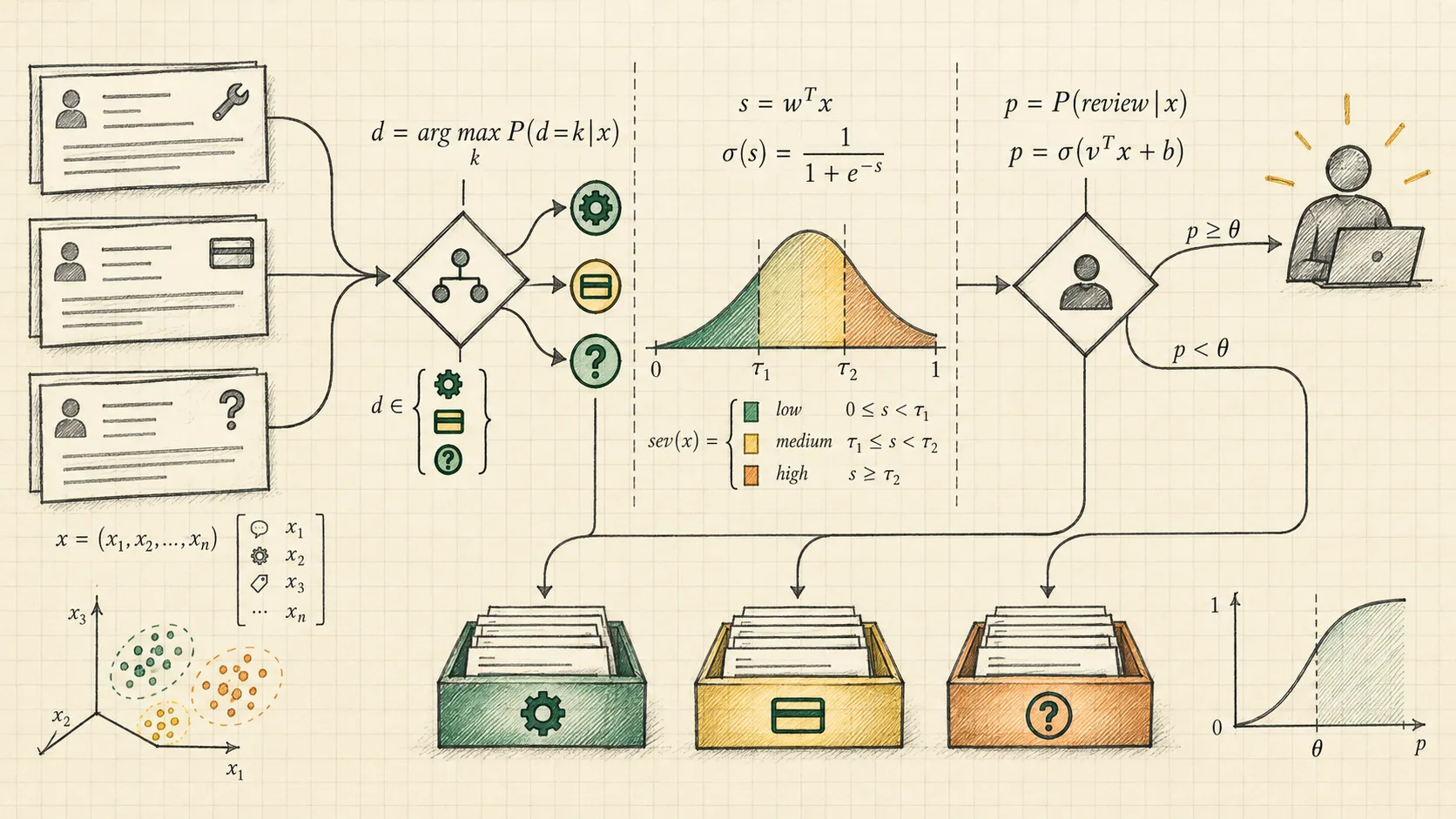
The support triage demo uses three sample customer tickets. For each ticket, the page says Jev returns three judgments in one request: a Choice for issue type, a Score for severity, and a Noul probability for human review. The simulated desk then applies a code-defined routing rule after the visitor reviews the answers.
The published rule is concrete: critical severity, human-review probability at or above 50%, or topic confidence below 55% sends the ticket to a person. Those numbers are the demo's policy, not universal thresholds. The first sample ticket describes repeated duplicate charges and an unanswered prior billing contact. Other tickets cover a production API error and a routine export question. Their differences make it possible to inspect whether the three judgments capture separate dimensions instead of collapsing every concern into one vague label.
A careful viewer should record the issue category, the full severity distribution, the human-review probability, and the branch the routing code took. If the final queue surprises you, determine whether the problem came from the model's answer or from the rule that interpreted it. The page explicitly says it does not send messages, issue refunds, or change accounts. Queue assignment is the simulated outcome.
Invoice review: inspect before disposition
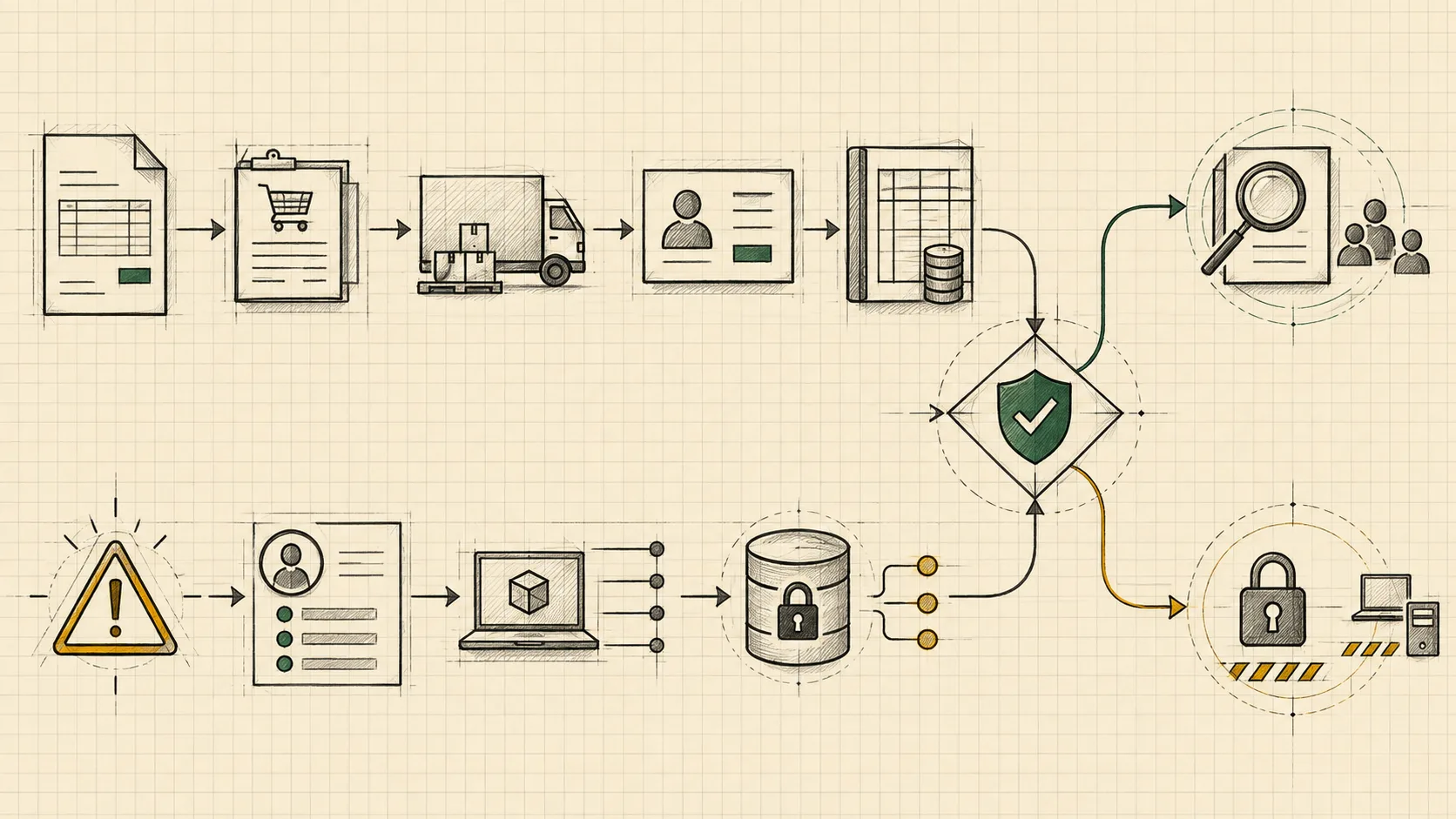
The invoice review demo provides three case types: matching records, an invoice already paid, and changed bank details. In the fictional LedgerFlow desk, Jev can inspect an invoice, purchase order, delivery record, vendor profile, and payment history before choosing a disposition. The starting invoice shows a vendor, purchase-order reference, line item, total, and masked payment account. The page also displays how many of the five records have been reviewed.
This makes evidence coverage visible. A disposition based only on the invoice itself can miss a duplicate payment or a changed account. In a run, note which record Jev opens next, what new fact becomes available, and whether the final route follows from the combined evidence. The three case types are useful for comparing behavior: a clean match may be routable, an already-paid case calls for duplicate-payment attention, and changed bank details call for a different review path. Do not assume the demo proves any real-world payment control; it uses fictional records and does not make a payment.
Security alert: evidence before response
The security demo begins with either unfamiliar production access or staging deployment activity. Its task is to inspect an alert and three evidence panels, then judge authorization, risk, and a next response in one request. Available dispositions include closing the alert, analyst review, or containing an asset and paging on-call—within the simulated console only.
The valuable question is whether the response is proportionate to observed evidence. An unfamiliar admin sign-in followed by attempted credential-store access is a different state from expected staging deployment activity. During a run, check what evidence was actually opened, what the typed answers say, and which policy gate allows the final response. A high risk score is a signal for code and operators; it is not authority to change a production device. The public page explicitly says the alert is fictional and no device is isolated or alert actually closed.
How to evaluate a demo run
Start in manual mode. The pages also advertise an auto mode with a three-second cadence, but manual review gives you time to read a request before its next action. Sign-in is required to start the public scenarios. For each step, save four observations: state, allowed choices, Jev answer, and executed transition. A result card without those four pieces can hide the source of an error.
Use this practical scorecard rather than judging only whether a scenario eventually finishes:
- State fidelity: Did the request include the information needed for the decision, and only information available at that point?
- Action validity: Was the chosen control, link, or disposition one of the options actually offered?
- Constraint satisfaction: Were dates, quantities, budget limits, and prohibited actions respected?
- Evidence coverage: Were related records inspected before a financial or security disposition?
- Uncertainty handling: Did low confidence or a high review probability change the route as the written policy says?
- Execution boundary: Did code apply the approved action while preventing checkout, payment, refund, or real containment?
- Reproducibility: Would a similar state get a similar judgment, and can you audit why a different branch occurred?
One run is a product tour, not an accuracy estimate. To evaluate your own workflow, collect labeled examples, include ambiguous and adversarial cases, run the same question definitions across them, and compare model judgments with outcomes. For Choice, measure category accuracy and confusion between options. For Score, examine whether neighboring severity levels are confused. For Noul, group predictions into probability bands and compare predicted review rates with observed need for review. Measure the percentage of cases routed to people, too: an apparently accurate system can achieve that by sending almost everything to manual review.
You should also keep the decision policy separate from the model. A 50% review threshold in a demo is easy to understand, but your acceptable threshold depends on the cost of a missed escalation versus unnecessary review. Set it on a held-out dataset, document the trade-off, and change it when the workflow or customer mix changes. If source data is incomplete, a deterministic missing-evidence rule can send the case to review before any probability is consulted.
From simulation to a real workflow
The demos are best treated as reference patterns. Begin with one narrow production decision, such as assigning a support queue or deciding whether a document needs review. Write down the allowed answers, the state fields, the action each answer may trigger, and the fallback for uncertainty. Then use the Jev API documentation to test the state and typed questions with your own examples. Keep authentication credentials on the server, validate responses, and have application code own every side effect.
For a browser workflow, first expose a small, verified set of available controls. Do not let a model invent arbitrary selectors or execute unseen actions. For finance and security, separate evidence gathering from disposition, and require the records your policy considers mandatory. For support, begin with routing or prioritization before granting the system authority to contact customers or modify accounts.
Finally, log a compact audit record: question version, state reference, available options, answer and probabilities, policy version, approval status, and executed action. That record lets a team explain a surprising outcome and compare changes over time. A demo helps you understand the moving parts; a deployment needs a measured error rate, an explicit review policy, and operational ownership.
Frequently asked questions
Are the Jev AI demos free to watch?
The public pages describe the scenarios and show their simulated starting states without a run. They display “Sign in to start” for interactive execution. Check the current site for account access and usage terms before relying on a particular plan or quota.
Do the demos control real websites or perform real transactions?
No. The public pages label the flight site, encyclopedia, grocery store, finance desk, and security console as simulations. They say there is no real checkout, payment, device containment, or customer message. They are designed to show decisions and application-controlled transitions.
Does Jev read screenshots in these demos?
The Jev developer documentation currently lists text, JSON objects, and arrays of text as state inputs, and says image inputs are not yet supported. The demo interface can present a visual page to a visitor while its application supplies a textual or structured representation of the current controls and records to Jev.
Which Jev model demo should I try first?
Try support triage if you want to understand Choice, Score, and Noul together in one request. Try flight search if you want to inspect repeated action selection as a page changes. Try invoice review if your main concern is whether a system gathers enough evidence before recommending a route.
What would count as evidence that Jev works for my use case?
Use a held-out set of cases from your own workflow, clear ground-truth labels, a documented policy, and measurements for errors, calibration, review volume, and failed or blocked actions. The demo trace is useful for understanding the mechanism; your evaluation establishes whether it meets your operating needs.
Source notes: scenario details were checked against the public Jev AI demo pages and developer documentation on September 27, 2026. Model interface details were also cross-checked with TypeSafe AI's official quickstart. Jev AI describes itself as independently operated and not affiliated with TypeSafe; verify provider-specific credentials, endpoints, and terms before integrating either service.