Developer Guides
Laya AI: Model Selection and API Integration Guide
Explore Laya AI, choose a Laya model, and integrate the Laya API with a working request, typed decisions, error handling, and a practical evaluation plan.

Laya AI turns context into bounded decisions: a category, an ordered score, or the probability of a yes/no proposition. The Laya model is useful when your application already knows the possible outcomes and needs help choosing between them. A Laya API makes those decisions available through an HTTP interface, but the model and the service exposing it are separate things.
Consider a support message: “Our checkout stopped working after the update. Customers cannot pay.” Your application needs a destination, a priority, and perhaps a human-review flag. It does not necessarily need a generated paragraph for each decision. Start with the Laya AI online playground to explore this pattern using your own examples.
This guide follows that workflow from model selection to an API request and production evaluation. Model details come from the upstream project; endpoint details describe the service at thejevai.com. Sources were checked on September 28, 2026. Examples and illustrations explain integration patterns; they are not measured performance results.
Table of contents
- What is Laya AI?
- Understand the three decision types
- Choose a Laya model for your workload
- Design the decision before calling the API
- Send your first Laya API request
- Handle limits, errors, and credits
- Evaluate decisions before automation
- Roll out a useful workflow
- Laya AI, model, and API FAQ
- Sources and maintenance
What is Laya AI?
Laya is an open-weight decision-model family from Convai Innovations, published under Apache-2.0. Its non-autoregressive architecture scores defined answers instead of generating a response one token at a time. The English checkpoint uses ModernBERT; the multilingual checkpoint uses mmBERT. The upstream Python package includes a router and supports local inference.
That architecture suits classification, routing, and focused assessment. A generative model can draft a customer reply while Laya supplies a routing signal. These components can work together because they serve different output contracts.
Keep three layers distinct:
| Layer | What you choose | What you must verify |
|---|---|---|
| Model | Checkpoint, revision, runtime | Accuracy on your workload |
| API | Authentication, request and response format | Limits, availability, actual serving setup |
| Application | Allowed actions and fallback rules | Whether a decision may trigger an action |
Structured output simplifies integration, but a valid label can still be wrong. Likewise, an open license does not eliminate hosting costs, and a benchmark from one GPU does not establish your application's response time.
Understand the three decision types
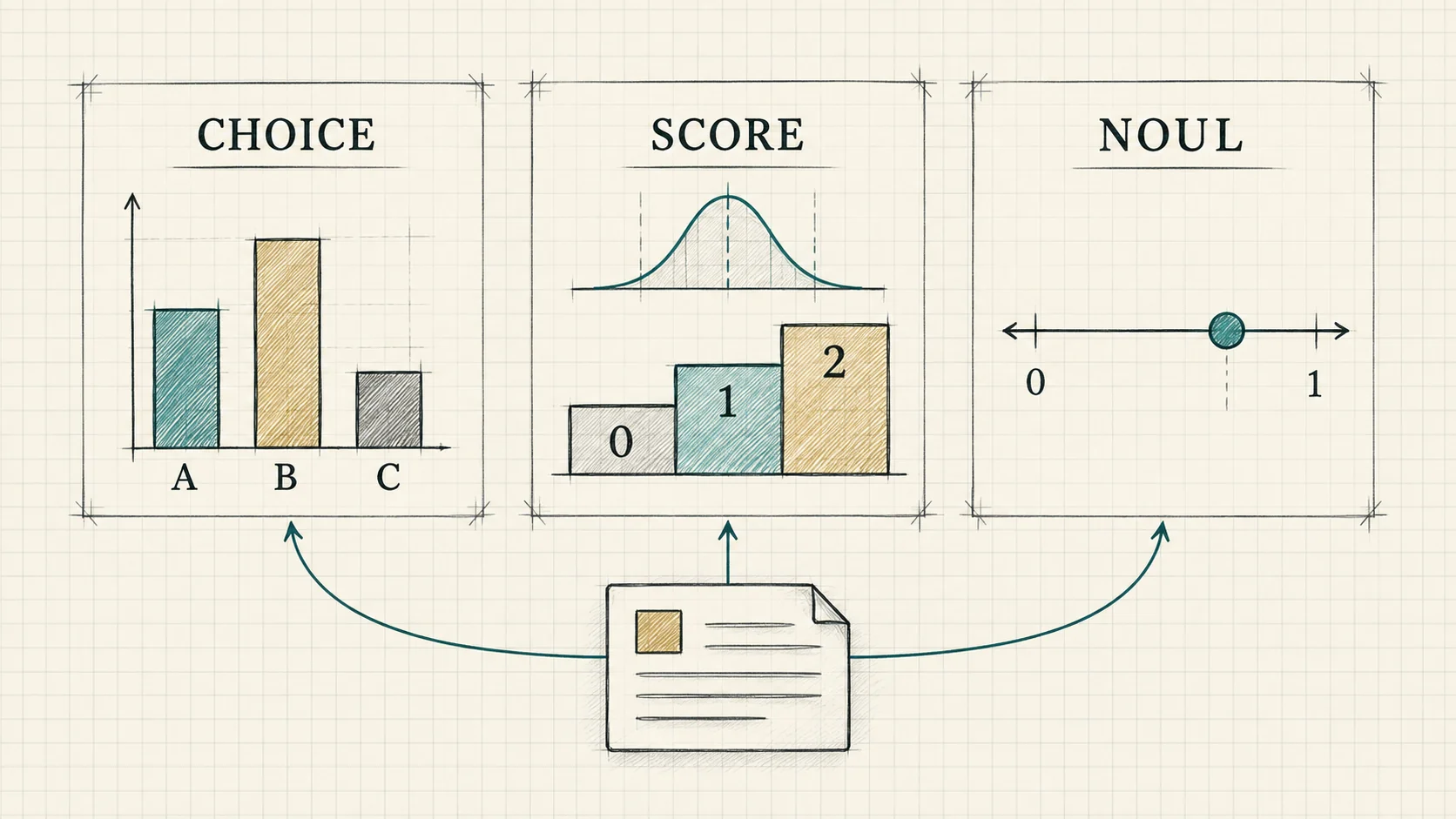
Choice: select a named outcome
Use choice for mutually understandable categories such as billing, technical, and other. The answer's choice field identifies the selected label; probability fields may also be available. Describe categories so that a person could apply the same rules consistently.
For example, “charged twice” belongs to billing, while “checkout crashes” belongs to technical. If one message contains both problems, specify which should control routing. An other label represents your defined fallback category; it does not automatically mean the model has detected uncertainty.
Score: assess an ordered scale
Use score when order matters. A useful urgency rubric might distinguish routine questions, work blocked with a workaround, and a service outage without a workaround. The hosted interface uses a zero-based scale, and the result can be fractional.
On a three-level scale, 1.8 lies between the second and third levels. It is not an 80% probability of an outage. Decide how your application handles intermediate values, and measure serious under-prioritization separately from harmless disagreements between neighboring levels.
Noul: estimate a specific proposition
Use noul for a focused yes/no question, such as whether the customer explicitly requests a refund. Its value represents a probability estimate, not a boolean. Never convert it with JavaScript's Boolean(value): even a small positive number becomes true.
Distinguish observed intent from authorization. “A refund is requested” does not establish that a duplicate payment occurred or that reimbursement is allowed. Those checks belong to verified records and application policy.
Choose a Laya model for your workload
The Laya model overview introduces the family and its decision interface. In the upstream project, the main choices are English, multilingual, and a checkpoint fine-tuned for particular typed-decision workflows.
| Candidate | Sensible starting workload | Evaluation priority |
|---|---|---|
| English | Predominantly English inputs | Domain vocabulary and ambiguous labels |
| Multilingual | Non-English or mixed-language inputs | Results for each supported language you actually receive |
| Typed-decisions | Workflows resembling its specialization | Transfer to your own labels, policies, and documents |
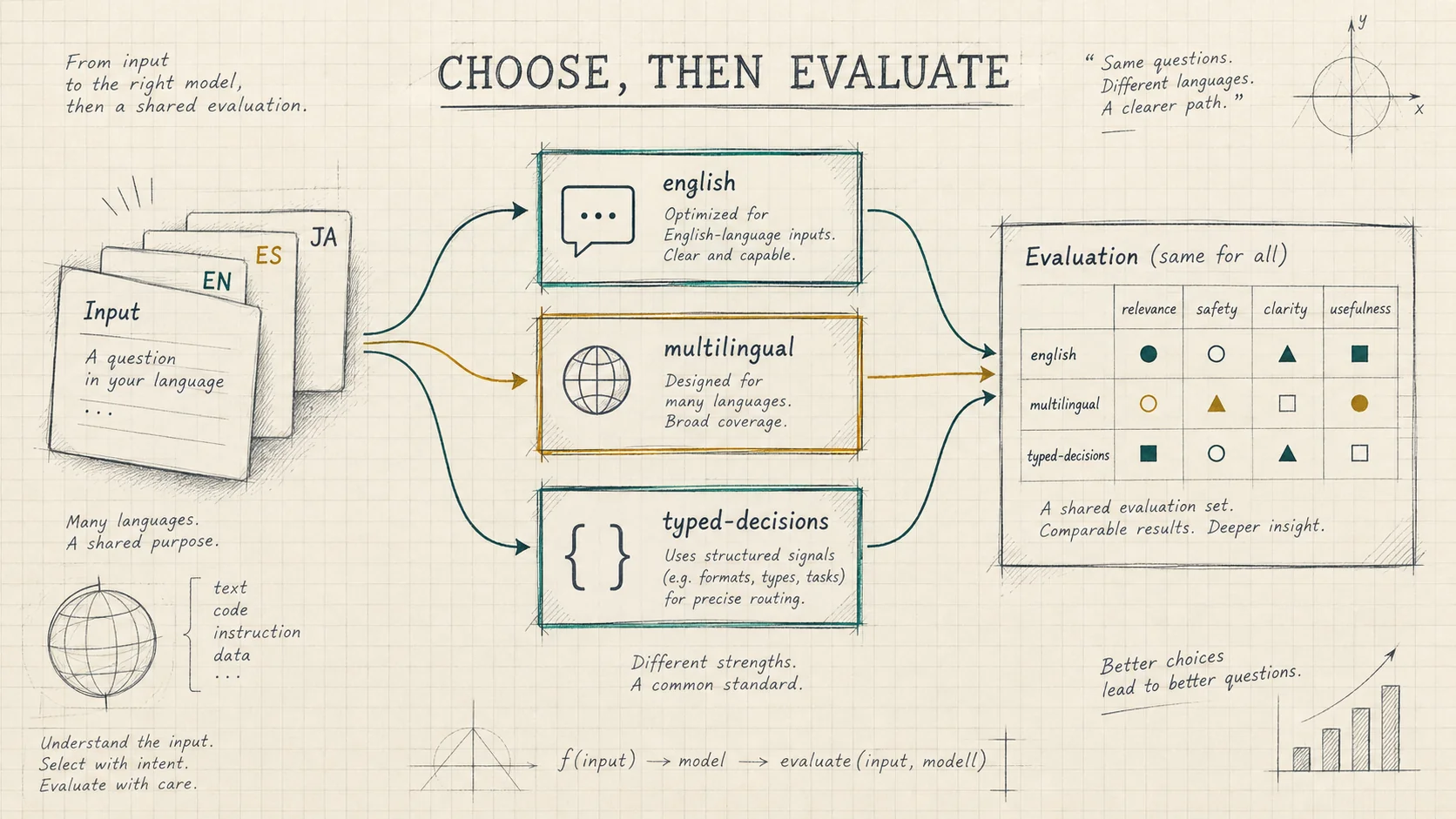
The hosted API accepts english, multilingual, and typed-decisions as request identifiers. These identifiers are part of its public contract, not proof of a pinned checkpoint. The current project implementation uses a provider adapter. Confirm the actual serving model and revision before treating hosted responses as evidence about a particular open-weight checkpoint.
For reproducible model comparisons, run pinned checkpoints under the same conditions. Record the package version, model revision, device, question wording, and context settings. Do not assume the hosted service exposes every setting available in the local SDK.
Language coverage also needs practical testing. A multilingual model's broad coverage claim cannot establish equal accuracy across languages, slang, transliteration, or mixed-language tickets. Slice results by these conditions instead of reporting only a global average.
If your taxonomy contains dozens of near-duplicate labels, test a two-stage design: select a broad family, then select a specialist queue within that family. This can give each label a clearer description, but the first stage can also send a request down the wrong branch. Compare the complete pipeline against a single-stage baseline, including extra latency and the ability to recover from a mistaken first choice.
Design the decision before calling the API
Start with a decision specification that names the input evidence, permitted outcomes, and consequences. For support triage, the model could recommend a queue and urgency. Your existing permissions system determines who can issue refunds or modify accounts.
Build state from the smallest sufficient context. Include the current customer message and relevant verified facts. Avoid a full conversation history when only the latest outage report matters. If the model needs an account condition, provide that condition explicitly instead of expecting it to infer unavailable data.
Write questions that remain meaningful when evaluated independently. A priority question should not depend on reading the answer to a routing question in the same request. When one decision genuinely depends on another, orchestrate separate steps in application code.
Before integration, assemble a small challenge set: a straightforward billing issue, a technical outage, a mixed request, an irrelevant message, a non-English ticket, and a message with missing evidence. Add negation, such as “I am not asking for a refund.” These cases quickly reveal vague criteria that a happy-path demonstration can hide.
Send your first Laya API request
The Laya API integration documentation describes the site's endpoint, authentication, and response envelope. Create an account API key, keep sufficient account credits, and store the key in the server environment as LAYA_API_KEY.
Send a POST to https://thejevai.com/laya/v1/systemone with Bearer authentication and JSON. The path has no locale prefix. Use a backend process so the key never enters a browser bundle.
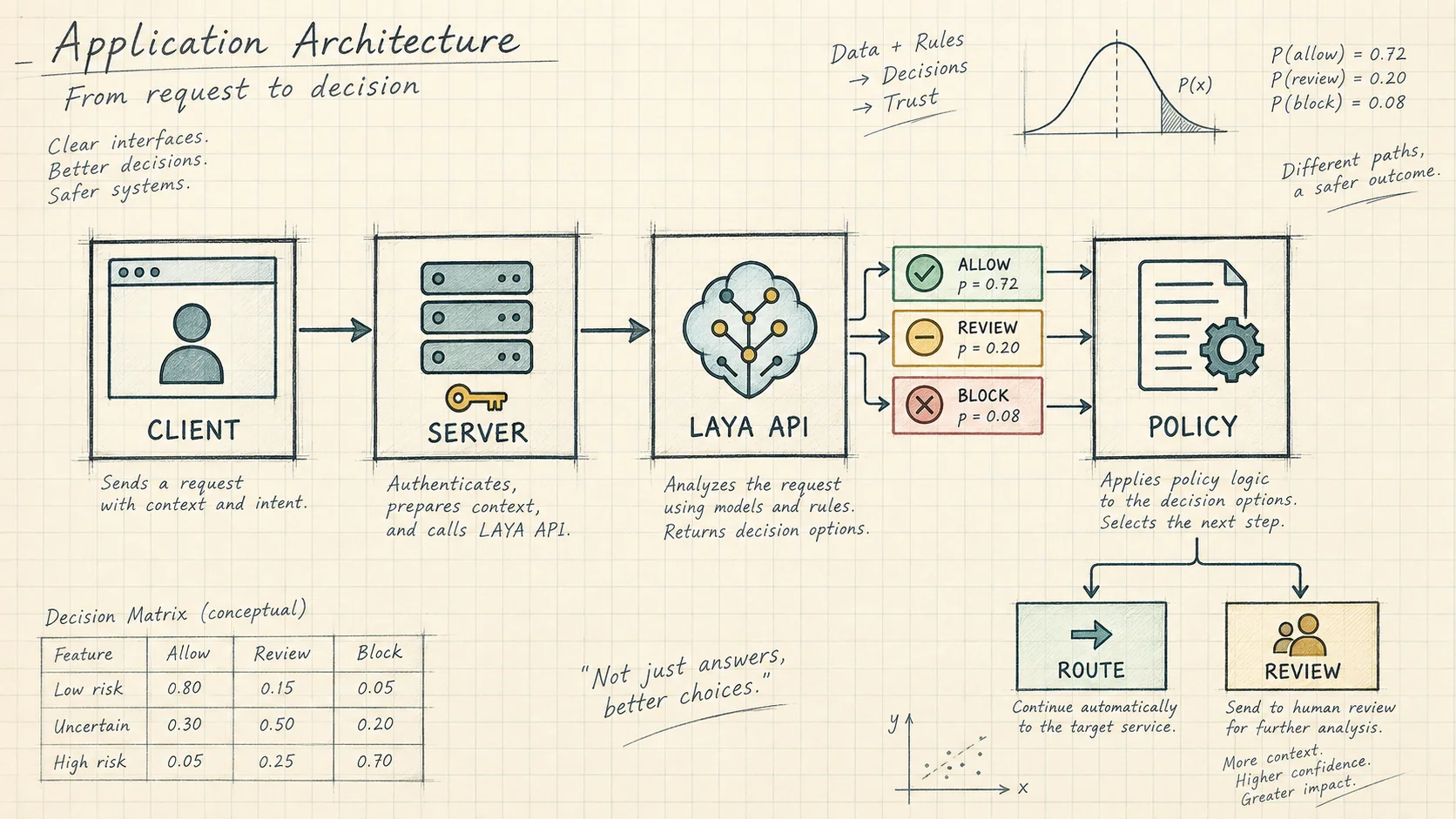
Save this example as laya-triage.mjs and run it with Node.js 18 or newer after setting the environment variable. It sends one request; it does not automatically retry a potentially billable operation.
const apiKey = process.env.LAYA_API_KEY;
if (!apiKey) throw new Error('Set LAYA_API_KEY on the server.');

const payload = {
  model: 'english',
  state: {
    message: 'Checkout crashes for every customer. Nobody can pay.',
    verified_status: 'No workaround has been confirmed.',
  },
  questions: {
    department: {
      type: 'choice',
      instructions: 'Which team owns the reported problem?',
      criteria: {
        billing: 'Charges, invoices, or refund requests',
        technical: 'Software failures or unavailable services',
        other: 'Issues outside billing and technical support',
      },
    },
    urgency: {
      type: 'score',
      instructions: 'Assess urgency using only the supplied evidence.',
      criteria: [
        'Routine question; work is not blocked',
        'Work is blocked but a workaround is confirmed',
        'Service is unavailable and no workaround is confirmed',
      ],
    },
    refund_requested: {
      type: 'noul',
      instructions: 'Does the customer explicitly request a refund?',
    },
  },
};

const response = await fetch('https://thejevai.com/laya/v1/systemone', {
  method: 'POST',
  headers: {
    Authorization: `Bearer ${apiKey}`,
    'Content-Type': 'application/json',
  },
  body: JSON.stringify(payload),
  signal: AbortSignal.timeout(45_000),
});

const body = await response.json();
if (!response.ok || body.code !== 0) {
  throw new Error(`Laya request failed: HTTP ${response.status}`);
}

const answers = body.data?.result?.answers;
const department = answers?.department;
const urgency = answers?.urgency;
const refund = answers?.refund_requested;
if (
  department?.type !== 'choice' ||
  !['billing', 'technical', 'other'].includes(department.choice) ||
  urgency?.type !== 'score' ||
  !Number.isFinite(urgency.score) ||
  urgency.score < 0 ||
  urgency.score > 2 ||
  refund?.type !== 'noul' ||
  !Number.isFinite(refund.noul) ||
  refund.noul < 0 ||
  refund.noul > 1
) {
  throw new Error('Unexpected decision output; send this case for review.');
}

console.log({ answers, creditsUsed: body.data.creditsUsed });
Read answers from data.result.answers, keyed by the question IDs you supplied. Check both HTTP success and code === 0. Validate returned types, labels, and numeric ranges before using them. The example prints results; connecting an error to a review queue is your application's responsibility.
The response also provides token usage and request timing under data.result, plus the actual credit charge in data.creditsUsed. A sample response's timing or charge is not a promise for future requests. Capture end-to-end client latency separately from server-reported elapsed time.
Handle limits, errors, and credits
At the time of checking, this hosted endpoint accepts a maximum UTF-8 JSON body of 32 KiB and one to eight questions. A choice question allows 2–100 options; a score question accepts 2–10 ordered descriptions. Signed-in playground calls have a three-second minimum interval. That playground rule should not be presented as a universal API-key rate limit.
The inference request has a 30-second timeout. Your client needs additional time for transport and the full response, although a longer client timeout cannot extend the service's own inference limit.
| HTTP status | Meaning | Appropriate next step |
|---|---|---|
| 400 | Invalid request | Correct fields or criteria |
| 401 | Authentication failed | Check the server-side key |
| 402 | Insufficient credits | Restore adequate balance |
| 413 | Body too large | Reduce context or split work |
| 429 | Requests too close together | Respect Retry-After when supplied |
| 502 | Inference failed or returned invalid data | Inspect the failure before deciding whether to retry |
| 503 | Service unavailable | Use a fallback or try later |
The endpoint does not document an idempotency key. After a client timeout, the first request may still complete and incur a charge. Blind retries can therefore create duplicate work and charges. Preserve the local job state, reconcile the outcome where possible, and make retry decisions explicit.
Also separate request size from model context. Passing the 32 KiB HTTP limit does not prove that every sentence or option survives a checkpoint's token budget. Test long inputs and large label sets specifically.
Evaluate decisions before automation
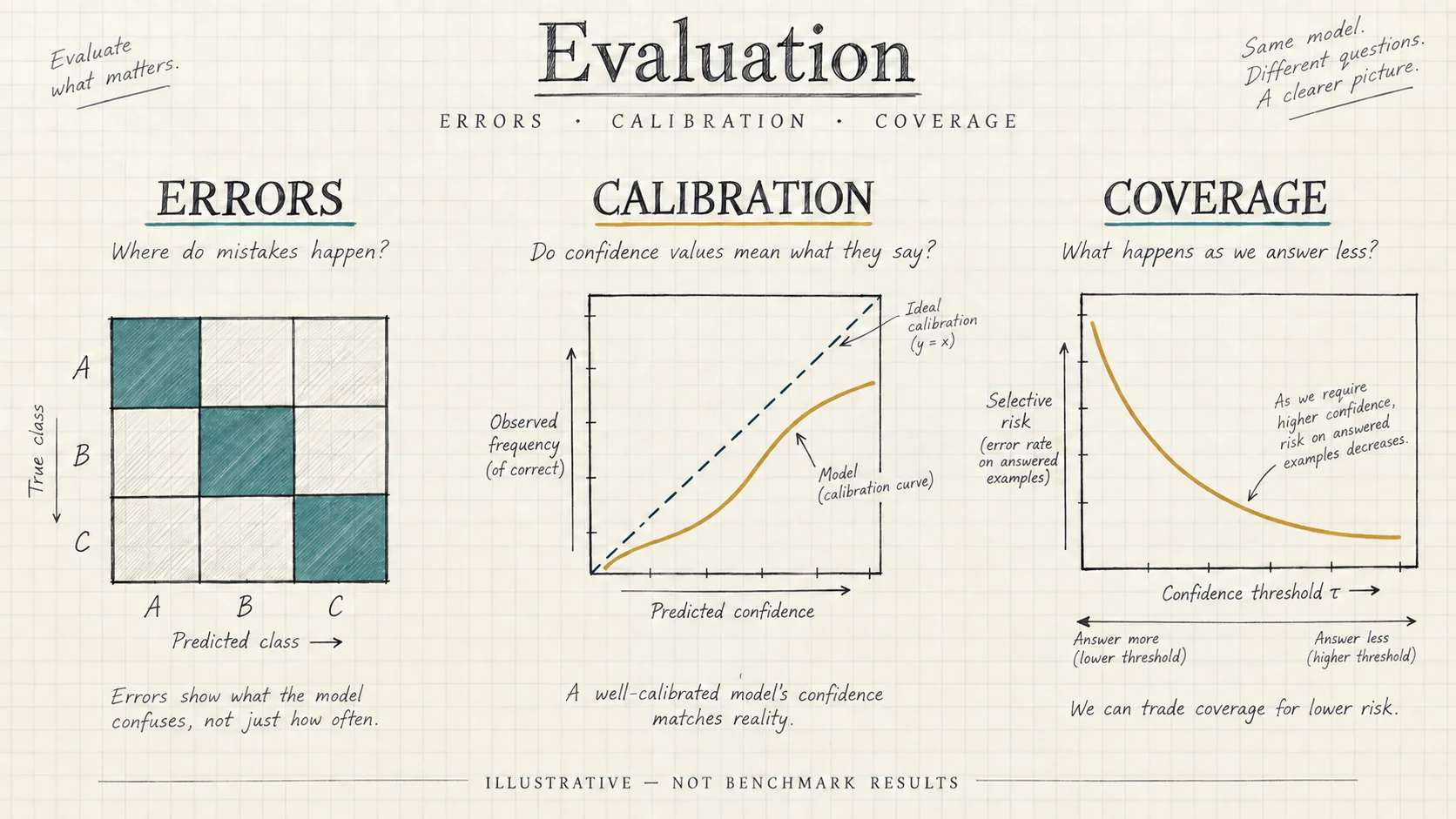
Build an evaluation set from real, appropriately handled workflow examples. Keep threshold-tuning data separate from the final test set. Split related messages together so that near-duplicate tickets cannot leak between training, validation, and testing.
Measure each output according to its consequences. For routing, inspect a confusion matrix and per-class precision and recall. For urgency, count severe underestimates alongside average error. For a refund-request detector, test explicit requests, denials, hypothetical discussions, and quoted messages.
Calibration deserves its own check. Group predictions with similar probabilities and compare them with observed frequencies. If predictions around 0.8 are correct only half the time, a threshold based on those numbers will behave differently from what its name suggests. Any calibration adjustment must be fitted without using the final test set.
The upstream model card reports important limitations, including overconfidence and sensitivity to label budgets. It also describes a noul failure mode in which option labels can dominate the input. If binary outputs appear stuck, investigate with contrasting examples and compare a two-option choice formulation. Do not assume this workaround succeeds without measuring it.
Evaluate abstention as a tradeoff. Define coverage as the fraction of cases handled automatically and selective error as the error rate within that subset. Higher thresholds can reduce automation and increase the review queue. Report both metrics, along with review workload, instead of celebrating accuracy on an increasingly small easy subset.
Use a simple baseline as well. A deterministic rule for an exact outage code or an existing queue classifier may already solve some cases cheaply. Compare Laya against that baseline using the same inputs and outcome definitions. Keep a short error log with representative failures and their causes, then change one factor at a time: the question, the supplied evidence, the checkpoint, or the threshold. This makes improvements explainable and reduces the temptation to tune a demonstration until it merely looks convincing.
Roll out a useful workflow
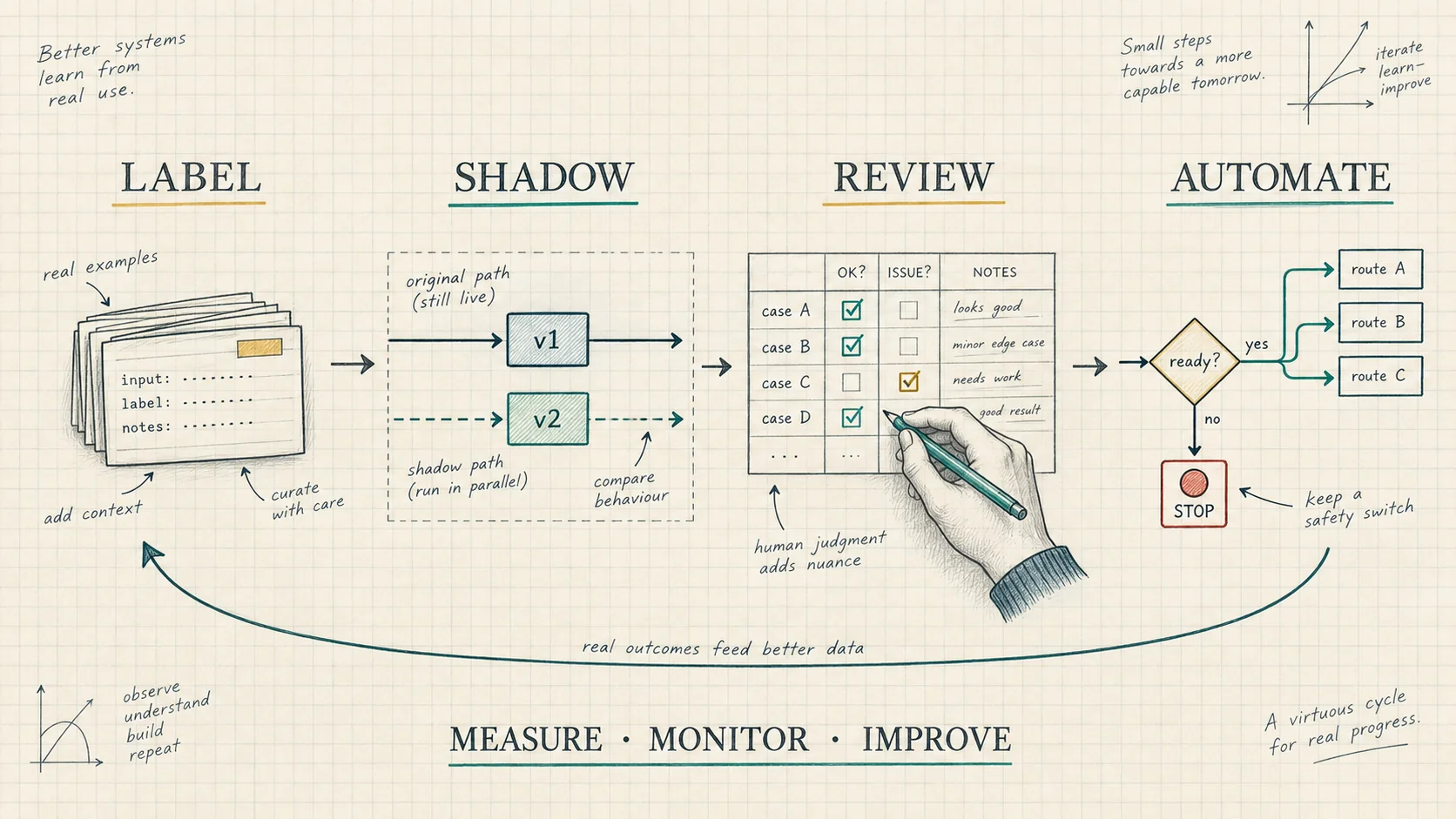
Begin in shadow mode: record recommendations while the existing workflow continues to determine outcomes. Compare decisions with human resolutions and inspect disagreement clusters. A repeated mistake may indicate unclear labels, missing context, language mismatch, or a poor model fit.
Next, let staff review recommendations before acting. This exposes the cost of review, whether scores are understandable, and whether the proposed route actually saves time. Automate a narrow, reversible action only when the measured error rate and operational benefit justify it.
For a support pilot, define success before launch: acceptable misrouting, maximum severe urgency misses, review capacity, and a fallback when the service fails. Keep a simple switch that restores the previous routing path. Reviewers should be able to correct a label without silently changing the underlying policy, and those corrections should feed the next evaluation dataset.
Record enough metadata to reproduce failures: your request identifier, schema version, submitted model identifier, available serving-version information, latency, charge, and eventual outcome. Minimize stored customer content. Track changes in input language, label frequency, and review volume because these can reveal drift before a global accuracy metric does.
Compare economics at the workflow level. Hosted credits, self-hosted compute, engineering maintenance, human review, and incorrect actions all contribute to cost. For broader deployment tradeoffs, the Jev vs Laya comparison provides additional context. Choose the setup that performs well on your evidence and operational constraints.
Laya AI, model, and API FAQ
Is Laya AI a chatbot?
Its core purpose is bounded decision-making. Use it to select, assess, or classify; use a generative model when the required output is open-ended prose. An application can combine both.
Is the Laya model free?
The published weights use Apache-2.0. Running them still consumes compute and operational effort. The hosted service described here consumes account credits, so open weights should not be confused with free hosted requests.
Does the Laya API automatically choose a checkpoint?
This site's API requires an explicit model identifier. The upstream local SDK has a router, but its routing behavior and options should not be assumed to apply to every hosted service.
Can Laya probabilities authorize an action?
A probability can inform a policy, but it cannot establish permissions or verify facts absent from the input. Keep consequential actions behind application checks and an appropriate review process.
Should I start with local inference or the hosted API?
Use the hosted interface to explore the request contract and workflow. Use pinned local inference when you need checkpoint-specific experiments or infrastructure control. Evaluate either option against the same representative cases.
Sources and maintenance
The upstream Laya repository documents installation, routing, serving, and runtime options. The Convai Innovations model card describes checkpoints, architecture, evaluations, and known limitations. Hosted request details were checked against the two site guides linked above and this project's endpoint implementation on September 28, 2026.
Recheck the serving backend, limits, and model revision before deployment. Start with one decision that matters, measure it on real examples, and expand automation when the evidence supports doing so.