API & Integration
Jev AI API Tutorial: Build Your First Structured Decision with Choice, Score, and Noul
Start with State, typed questions, and structured responses. This Jev AI API tutorial shows how to use Choice, Score, and Noul for classification, scoring, routing, and safety checks.

If you have already tried the model in the Jev AI Playground, the next step is usually to connect one real judgment to a server-side workflow: receive a ticket or message, define the questions your product needs answered, read probabilities and confidence, and let code choose routing, queueing, or human review.
The Jev AI API is not primarily a chat request. Its central model is three clear inputs: State, Model, and Questions. State describes the context, Questions describe the judgments, and the response returns typed results by question ID. This lets you place AI judgment inside existing functions, queues, and agent workflows instead of adding another chat surface.
This tutorial covers the request shape, the choice between Choice, Score, and Noul, a minimal curl request, response handling, control flow, error boundaries, and a production checklist.
Tutorial goal: Build one low-risk support-ticket judgment and let a server decide whether to route it automatically or request a human review.
Table of contents
- Understand the Jev request model
- State: provide context
- Questions: choose Choice, Score, or Noul
- Make your first Jev API request
- Read and handle the response
- Connect the result to application logic
- Production checklist
- Frequently asked questions
Understand the Jev request model

Image: State provides context, Questions describe the judgment, and the structured result returns to your service.
The basic idea can be written as:
state + model + questions
            ↓
typed answers + probabilities + confidence
            ↓
your application logic
The current website documentation uses POST https://thejevai.com/v1/systemone as the production request endpoint. A request has three core fields:
state: a string, JSON object, or array of text;model: the model name, such astypesafe/jev-1.13;questions: typed questions keyed by stable business IDs.
Jev makes the judgment. Your application still owns authentication, input sanitization, thresholds, retries, logging, and the final action. For the broader product model, read the Jev AI introduction.
State: provide context
Use a string for a simple case
When every judgment is about one message, a string is the simplest state:
{
  "state": "The customer has tried to connect Stripe for three days."
}
This works well for support messages, alerts, form descriptions, user feedback, and short tickets.
Use a JSON object for structured context
When a judgment needs a ticket, order, and policy at the same time, use an object:
{
  "ticket": {
    "text": "The customer has tried to connect Stripe for three days.",
    "channel": "email"
  },
  "customer": {
    "plan": "pro",
    "days_open": 3
  },
  "policy": {
    "same_day_escalation": true
  }
}
An object makes shared facts available to every question, but it does not mean that every system field should be sent. Provide the minimum context needed for the judgment, and remove secrets, payment data, and unnecessary personal information before the request leaves your service.
Use an array for related text
Multiple messages, retrieval snippets, or conversation summaries can be represented as an array of text. Each item should be relevant to the current judgment; do not mix unrelated material into State and expect the model to ignore it perfectly.
The current site documentation lists text, JSON objects, and arrays of text as supported inputs. Images, audio, and video are not currently direct inputs. Preprocess them with transcription, OCR, or another service first.
Questions: choose Choice, Score, or Noul

Image: The question type determines the response shape and how the result enters control flow.
| Question type | Use it for | Main result | Typical action |
|---|---|---|---|
| Choice | Pick one option from a set | choice, probabilities, confidence | Routing, classification, model selection |
| Score | Rate against an ordered rubric | score, legend, probabilities, confidence | Ranking, priority, SLA |
| Noul | Judge whether a statement is true | noul (yes probability) | Blocking, confirmation, escalation |
Choice: classification and routing
Use Choice when the answers can be listed: support teams, content categories, task types, and model tiers. Include other or none-of-the-above for unknown cases rather than forcing an incorrect match.
Score: ordered evaluation
Use Score for severity, satisfaction, urgency, and risk levels. Levels should be ordered from low to high and have concrete descriptions. Do not define only “low, medium, high”; describe which business action each level should trigger.
Noul: one yes/no judgment
Use Noul when the question can be rewritten as “Is this statement true?” Examples include “Is the customer explicitly asking for a refund?” and “Does this tool call require human confirmation?” Noul returns a yes probability and should not be confused with a separate confidence field.
TypeSafe’s documentation emphasizes atomic questions. Instead of asking one question to determine department, priority, and risk, split them and combine their results in code.
Make your first Jev API request
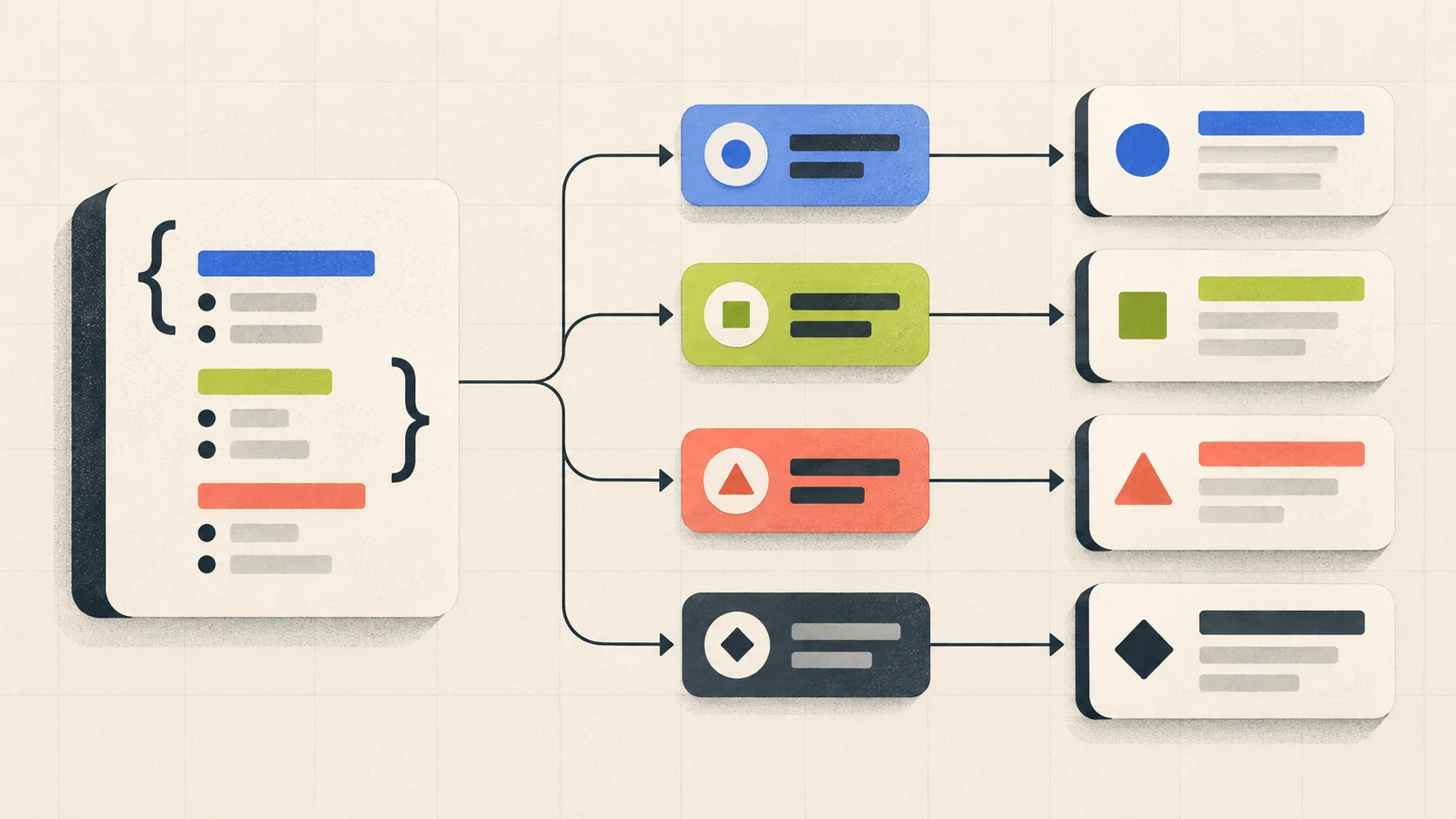
Image: Validate one small, well-scoped request before expanding to multiple questions.
Prepare an API key
Store the API key in a server-side environment variable:
export JEV_API_KEY="your-server-side-key"
Never put the real key in browser code, a client bundle, a public article, or a Git repository. For current key-management guidance, see the Jev AI API documentation.
Send a minimal Noul request
The following request follows the field shape currently shown in the official website docs:
curl -X POST https://thejevai.com/v1/systemone \
  -H "Authorization: Bearer $JEV_API_KEY" \
  -H "Content-Type: application/json" \
  -d '{
    "model": "typesafe/jev-1.13",
    "state": "A customer has tried to connect Stripe for three days.",
    "questions": {
      "urgent": {
        "type": "noul",
        "instructions": "Does this message express urgency?"
      }
    }
  }'
Use the Playground to inspect a request
If you are unsure about the complete JSON shape for Choice or Score, define a question in the Playground, run it, and inspect the API request preview provided by the page. This is safer than guessing field names from an old example.
Read and handle the response

Image: Validate the response and threshold before sending it to automation or review.
Read answers by question ID
The response uses the question IDs you sent. Conceptually, it can look like this:
{
  "answers": {
    "urgent": {
      "noul": 0.87
    }
  },
  "usage": {
    "input_tokens": 42,
    "output_tokens": 0
  },
  "elapsedMs": 214
}
This is a response illustration, not a complete API schema. Use the official API reference for current fields, errors, and model versions.
Treat probability as a signal, not a verdict
Set different thresholds for different risk levels:
- Low-risk ticket routing:
urgent > 0.8may enter an automatic queue. - Medium-risk actions:
0.6–0.8may trigger sampling or a second judgment. - High-risk actions: even a high probability should still pass authorization, hard rules, and human confirmation.
Thresholds are your business policy, not a default Jev answer. Calibrate them against historical data and counterexamples.
Handle errors and timeouts
A production client should handle non-2xx responses, timeouts, missing fields, unknown choices, model-version changes, and duplicate submissions. Retries need an idempotency strategy; a network failure must not repeat a payment, deletion, or permission change.
Connect the result to application logic

Example: support-ticket priority flow
result = jev.system_one(
    model="typesafe/jev-1.13",
    state=ticket,
    questions={
        "needs_human": {
            "type": "noul",
            "instructions": "Does this ticket require a human review?"
        }
    },
)

if result.answers["needs_human"].noul >= 0.85:
    queue_for_review(ticket)
else:
    route_automatically(ticket)
The example illustrates control flow. Use the current official docs and the request exported by the Playground for exact Python SDK, JavaScript SDK, or REST fields.
Design multi-question requests intentionally
One State can support several questions:
department: Choice for the handling team;urgency: Score for priority;needs_human: Noul for review.
Each question should describe one judgment. The application combines results into actions, so changing a routing policy does not require rewriting the urgency or review question.
Production checklist
Before shipping, confirm that:
- The API key exists only in server-side secrets or an environment manager.
- State has length limits, sensitive-data handling, and permission checks.
- Every question has a stable ID, a defined answer space, and clear instructions.
- The client validates HTTP status and response shape.
- Probability thresholds vary by risk level instead of using one global number.
- High-impact actions keep hard rules, authorization, and human review.
- The system records model version, question definition, input summary, and final action.
- Timeouts, retries, fallbacks, and human takeover paths are explicit.
- Chinese, English, specialist terms, and boundary cases are in the evaluation set.
- Usage and plan details are checked against the Jev AI pricing page and current API docs.
For architecture and model selection, continue with Jev AI vs LLMs. For agent routing and safety, read Jev AI agent guardrails.
Frequently asked questions
Is the Jev AI API a chat endpoint?
No. It accepts State and typed questions, then returns structured answers that an application can read. It can be a judgment node inside a chat system or agent, but it is not designed to generate chat paragraphs.
Can one request contain several questions?
Yes. The website and TypeSafe documentation describe multiple questions evaluated against the same State. Keep each question independent, well-scoped, and keyed by a stable ID.
Is the Noul value the same as confidence?
No. Noul is the probability that the answer is yes. Choice and Score return their own probability and confidence fields. Always use the current API docs for the exact response shape.
Does Jev support images?
The current website docs list text, JSON objects, and arrays of text as State inputs. Images, audio, and video are not direct inputs at this time. Preprocess them with OCR, transcription, or another model first.
How do I know whether the API fits my product?
Start with one low-risk, measurable decision whose answer space is clear. Validate it in the Playground, then test server-side behavior against historical data and edge cases.
Conclusion
The important part of a Jev AI integration is not making one model call. It is separating state, questions, results, and actions. State supplies facts, Choice/Score/Noul supplies the judgment, probabilities expose uncertainty, and application code owns the final move.
Once this chain is documented, tested, and monitored, Jev AI can move from a Playground demo to a maintainable decision component inside your product.
Research date: 2026-09-20
Primary sources: Jev AI homepage, Jev AI Docs, Jev AI Playground, TypeSafe introduction